


InColor goes beyond typical color-by-number apps by giving you the freedom to pick your own colors and paint however you like. It feels more like a real coloring and drawing app than a simple tap-to-fill game.
The app also includes an AI drawing generator for custom coloring pages and a community where you can share and browse artwork. Freehand coloring is the main experience, with stylus support for detailed work. Color-by-number is available, but only through a pro account, and some features can be temporarily unlocked by watching ads.
| What Works Well | Things to Keep in Mind |
|---|---|
| Full creative freedom — you pick your own colors and paint your way | Aggressive monetization — the free version constantly pushes upgrades |
| Smooth stylus support for detailed work | Core features like color-by-number are locked behind a paywall |
| Active community for sharing and discovering art | Some features require watching ads to unlock temporarily |
| Fewer ads than most free coloring apps |
InColor offers solid creative control and realistic painting tools, but the free experience comes with noticeable limits. Key features are locked behind a subscription or frequent ad viewing, and the app regularly nudges you toward upgrading.
If you’re looking for a coloring platform that gives you full access without paywalls or pressure to pay, you might want to explore other alternatives.

Now, Why ColoringHub Really Stands Out?
As someone who genuinely loves coloring (and has tried a lot of platforms), I have to say — ColoringHub offers some really refreshing advantages. It focuses on access, simplicity, and volume in a way that feels generous and easy.
Here are some clear reasons why it stands out:
1. You Can Start Coloring Right Away
One of the best things about ColoringHub is how fast you can begin. There’s nothing to download, no account to set up, and no email address required.
You simply open the website, pick a coloring page, and start coloring immediately. That kind of instant access makes the whole experience feel easy and low-pressure, especially when you just want a short creative break or don’t feel like adding another app to your device.
This makes ColoringHub especially ideal for:
- Quick relaxing breaks for adults
- Kids who want to print and start coloring right away
- Classroom use and group activities
- Anyone who prefers not to install another app
2. The Library Is Massive (and Genuinely Free!)
ColoringHub provides an impressive collection of coloring pages—we’re talking tens of thousands of designs across hundreds of categories. And yes, they’re truly free.
You’ll discover:
- Kid-friendly illustrations
- Adorable Kawaii illustrations
- Mandalas and intricate patterns
- Animals, holidays, nature scenes, florals, and more
Everything is clearly sorted, so you can quickly find something that fits your mood or skill level without endless scrolling. It feels organized and easy, not overwhelming.
3. Two Coloring Options: Online or Printable
Another thing you’ll likely appreciate is the flexibility. ColoringHub doesn’t limit you to just one coloring method. You can use the online browser tool or download high-quality PDFs to print at home.
This is especially convenient if you enjoy switching between digital coloring and traditional paper coloring. It’s also practical for parents and teachers who need printable pages quickly, without having to sign up or take extra steps.
4. A Simple and Enjoyable Coloring Tool
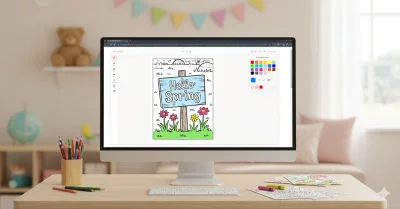
The online coloring tool keeps things clear and stress-free. The layout is tidy, and the tools are positioned where you’d expect, so you’re not clicking around trying to figure things out.
You get:
- A fill bucket
- Several brush types (brush, marker, glitter, highlighter, splatter)
- Adjustable brush size and opacity
- Zoom, pan, undo, and redo options
- Easy download or print once you’re finished
The color features are also surprisingly flexible for a free platform. You can choose from preset palettes, create custom colors, use the eyedropper for exact matches, or try the random color feature if you want fresh inspiration.
5. Great for Families and Teachers
While many coloring platforms focus mainly on adults and highly detailed artwork, ColoringHub works well for a wide range of users. Its clearly labeled sections—Kids, Kawaii, and Mandala & Patterns—make it simple to find designs that suit different ages and skill levels.
For teachers, this is especially useful. You can download and print multiple coloring pages quickly, which is perfect for classroom activities or group sessions. Parents benefit too, since they can offer kids printable pages for hands-on coloring instead of extra screen time.
That combination of digital access and printable options is where ColoringHub really stands out. It keeps coloring flexible, practical, and family-friendly.
6. Smooth Performance Across Devices
ColoringHub runs directly in your web browser and works smoothly on modern devices. Pages load fast, and the coloring experience feels light and responsive. While the online tool performs best on desktop, mobile users can still browse comfortably and download printable pages without trouble.
The site also offers multi-language support, making it accessible to users from different regions and backgrounds.
Summary Table
| Feature | InColor | ColoringHub |
|---|---|---|
| Platform | Mobile app (iOS & Android) | Browser-based website (works on any modern browser) |
| Access | Requires app download; account needed for full features | No sign-up, no download — just open and start |
| Cost | Free with limited features; pro subscription for full access | Entirely free with no paywalls |
| Creative Control | Full color freedom with freehand painting and blending | Freehand coloring with customizable brushes, palettes, and hex code input |
| Coloring Options | Freehand coloring; color-by-number (pro only) | Online browser coloring or downloadable print-ready PDFs |
| Audience | Artists and creatively inclined users | Kids, families, educators, casual colorists |
| Tools | Painting and blending tools, AI page generator, stylus support | Fill bucket, multiple brushes (marker, splatter, highlighter, glitter), eraser, eyedropper, color randomizer |
| Ads | Present with ad-based unlocks; frequent upgrade prompts | Non-intrusive ads; no upgrade pressure |
| Artwork Style | Community and AI-generated pages | AI-generated illustrations across 950+ articles |