


If you’ve been exploring digital coloring apps for adults, Pigment is likely one of the first names you’ve come across — and for good reason. It’s widely considered one of the most realistic and immersive coloring apps available, thanks to its lifelike pencil, marker, and paintbrush simulations that truly feel closer to traditional art than most competitors.
With access to over 10,000 professionally illustrated pages, daily new additions, multiple coloring modes (from tap-to-fill to advanced freehand control), and full Apple Pencil sensitivity, Pigment has built a reputation as a premium choice for serious adult colorists.
But Pigment isn’t perfect for everyone. Many of its best tools are locked behind a subscription, it’s exclusive to iOS, and casual users may find the free version too restrictive.
So if you love the idea of Pigment but want something more affordable, more flexible, or available on Android, we went ahead and ranked and reviewed the best alternatives — from free apps to premium competitors — so you can find the coloring experience that fits your style best!
1. ColoringHub
ColoringHub is a free, browser-based coloring website that keeps things simple, accessible, and easy to use. You can download printable coloring pages or color straight online using the built-in tool—no account required, no sign-ups, and nothing to install.
The amount of content available is honestly impressive. ColoringHub offers more than 950 articles, each with an average of 100+ coloring sheets, totaling tens of thousands of free designs. That kind of variety is hard to find, especially on a platform with no paywall.
Content is neatly organized into three main sections: Kids, Kawaii, and Mandala & Patterns, making it easy to browse depending on your style or preferred difficulty level. Categories range from animals and nature to holidays, florals, and plenty of other themed collections.
The site works smoothly on any modern browser. The online coloring experience is best on desktop, while mobile users can still browse the library and download printable PDFs without hassle.
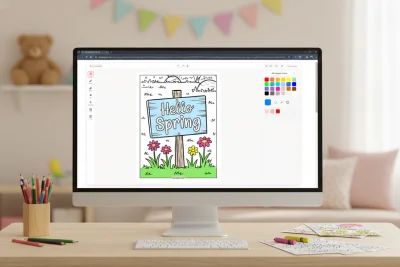
The Online Coloring Tool
ColoringHub’s online coloring tool is designed to stay simple and beginner-friendly. The layout is clean, with tools on the left, settings along the top, and colors on the right, so everything feels organized rather than cluttered.
You’ll find useful features like a fill bucket, several brush styles (brush, marker, splatter, highlighter, glitter), adjustable brush size and opacity, an eraser, zoom and pan controls, plus undo/redo options. Finished pages can also be printed or downloaded directly from the tool.
The color system is surprisingly flexible for a free platform. You can choose from preset palettes, build your own custom sets, enter hex codes for exact shades, use an eyedropper tool to sample colors, or try the randomizer for quick inspiration.
The tool is still in Beta, and there’s a simple feedback option available if you want to help shape future updates.
What Works Well
- Totally free access. No subscriptions, paywalls, or registration needed.
- Huge content library. Tens of thousands of pages across many themes and styles.
- Two ways to color. Print pages at home or color digitally online.
- Instant printable PDFs. Perfect for classrooms, families, and offline use.
- Easy but effective tools. Multiple brush options with size and opacity controls.
- Fast performance. Pages load quickly and coloring feels smooth.
- Global accessibility. Multi-language support makes it usable worldwide.
Things to Keep in Mind
- Best suited for single-session coloring. Progress isn’t saved yet, so it’s ideal for finishing a page in one go.
- Optimized for desktop. Mobile browsing works well, but online coloring performs best on larger screens.
- AI-generated artwork. All illustrations are AI-created, which may be a consideration for users who prefer hand-drawn art.
- Ad-supported platform. Advertisements are present, though they’re generally unobtrusive.
- Still under development. Ongoing updates are expected while the tool remains in Beta.
Bottom Line
ColoringHub stands out as a fully open and low-friction source for free coloring pages. With its massive library, quick printable downloads, and in-browser coloring tool, it offers a level of accessibility that’s hard to beat.
It’s particularly well-suited for quick coloring sessions, classroom use, or anyone who wants immediate access without installing an app or creating an account. While it doesn’t aim to replace premium coloring apps with cloud saves and advanced tools, that isn’t its goal. Instead, it delivers simplicity, variety, and solid value at no cost.
If you’re searching for free coloring pages with no barriers to entry, ColoringHub is a strong option.
Best for: Free printable coloring pages, teachers and parents, browser-based coloring fans, quick one-session coloring, users who want instant access without accounts
Skip if: You need saved progress, prefer a mobile-first coloring experience, want strictly hand-drawn artwork, or require advanced professional tools
2. Cozy Cottage Coloring: Chroma
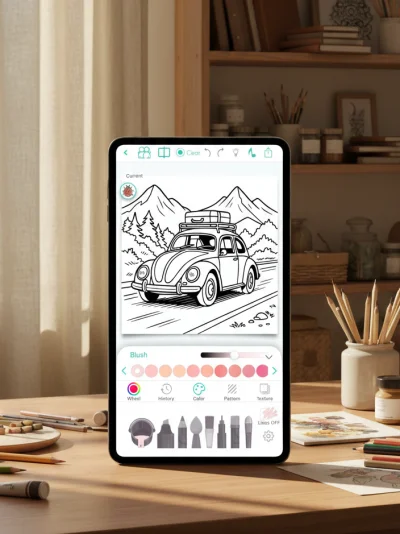
Chroma is a refined coloring app made for adults who want more precision, control, and high-end tools. You can color stroke by stroke with realistic pencils, markers, brushes, and watercolor effects, or switch to tap-to-fill if you want something faster. Everything feels thoughtfully designed, with a clear goal of making digital coloring feel as close to traditional coloring as possible.
The app includes thousands of coloring pages across well-loved themes such as mandalas, florals, animals, fantasy scenes, and portraits. It also offers creative extras like AI-generated custom pages, photo-to-coloring conversions, real-time coloring with a friend, and the ability to replay your full coloring session as a time-lapse video.
What Works Well
- High-quality tools. Brushes feature realistic textures with adjustable thickness and opacity, so coloring feels smooth and natural rather than flat.
- Creative flexibility. Stay within the lines or color freely using gradients, textures, a full color wheel, and curated palettes.
- Time-lapse recording. Quickly share your coloring process as a short replay video.
- Buddy coloring. Work on the same page with someone else in real time.
- Community sharing. Upload your artwork to the Chroma Gallery and interact with other users.
- Apple Pencil support. Excellent responsiveness and precision on iPad.
Things to Keep in Mind
- No free access. The app requires an upfront purchase, with no trial or limited free version available.
- iOS only. Chroma isn’t currently offered on Android devices.
- Some AI artwork. Not every illustration is fully hand-drawn, which may matter to some users.
Bottom Line
Chroma stands out for its professional-level tools, realistic textures, and standout features like collaborative coloring and time-lapse replays. While the lack of a free option may be a downside, its strong ratings suggest most users feel the quality is worth the cost.
Best for: iOS users, Apple Pencil owners, adults seeking premium coloring tools, and anyone who enjoys social or collaborative coloring.
Skip if: You want to try before paying, use Android, prefer free or freemium apps, or need a more budget-friendly option.
3. Lake: Coloring Book
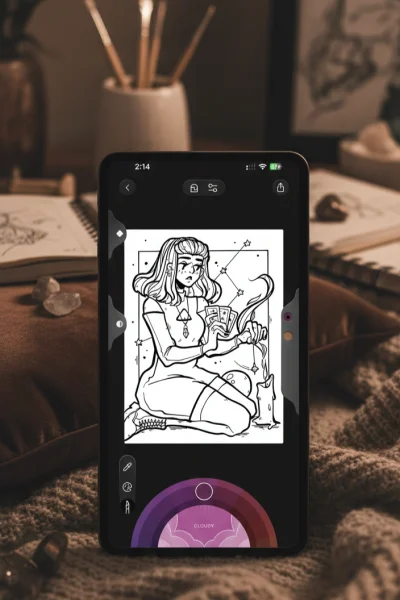
Lake: Coloring Book is designed as more than a typical coloring app—it’s a calming creative retreat that blends coloring with wellbeing and community. The platform features hand-drawn illustrations from independent artists and encourages slow, mindful creativity rather than fast, casual coloring. The interface feels bright and welcoming, and the built-in tutorial guides you through the tools from the very beginning.
What truly sets Lake apart is its emphasis on intention and quality. The collection is thoughtfully curated, the brushes feel realistic with natural shading and blending, and the color system is especially impressive, offering over 700 shades along with mood-based palettes, a color picker, and an eyedropper feature.
What Works Well
- Stunning hand-drawn artwork. Every page is illustrated by independent artists.
- Artist-focused support. Subscription revenue helps directly support the creators behind the designs.
- Premium brush tools. Realistic textures with controls for size, opacity, shading, and blending.
- Helpful video lessons. Learn techniques and improve your coloring skills instead of guessing.
- Fresh curated updates. Monthly additions and Book of the Week challenges keep the app feeling active.
Things to Keep in Mind
- Very limited free access. The free version feels more like a short trial than a full experience.
- Subscription required. Most tools, including the complete library, are behind a paywall.
- iOS only. Lake isn’t available for Android users.
- Smaller content library. Around 1,500 illustrations, which is less than many competing apps.
- Higher premium pricing. Costs are higher than what you’ll find on more basic coloring platforms.
Bottom Line
Lake: Coloring Book stands out for its artist-first mission and wellbeing-centered approach. The artwork is beautiful, the tools feel refined, and extras like mood palettes and ASMR-style sounds add depth to the experience. That said, it’s clearly a premium-focused app, with minimal free content and a smaller overall library, making it best for users who value curated, meaningful designs and don’t mind paying for a subscription.
Best for: iOS users who want to support independent artists, adults seeking mindful or wellness-based coloring, people who prioritize quality over quantity, and users comfortable investing in premium subscriptions.
Skip if: You’re on Android, want lots of free content, prefer massive libraries, or are trying to avoid subscription costs.
4. Happy Color
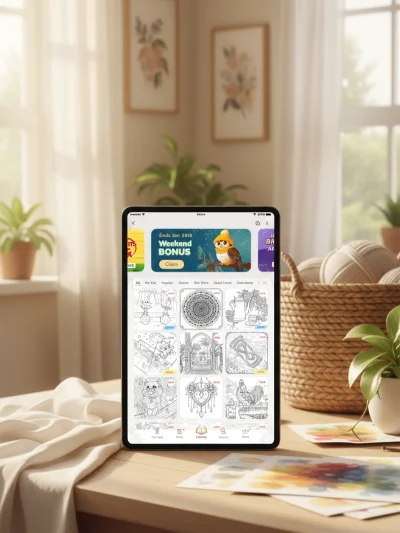
Happy Color is a paint-by-numbers app, which means you won’t be picking colors or making artistic choices. Instead, you simply tap the numbered areas on the screen, and the app fills them in automatically with the correct matching shade. It includes more than 15,000 free designs across a wide range of categories, plus exclusive Disney and Marvel collections and daily new pages to keep the library feeling updated.
The real challenge isn’t choosing colors, but locating every small numbered section—especially in detailed images that contain hundreds of tiny spaces. That complexity keeps the experience engaging and makes the app better suited for adults, since many designs would likely feel too intricate for younger children.
What Works Well
- Massive free library. With 15,000+ designs, there’s no shortage of variety.
- Strong zoom tools. Extremely helpful for finding tiny sections.
- Great for effortless relaxation. Perfect when you want to unwind without thinking too much.
- Ads are fairly manageable. They’re present, but not overly intrusive, and a one-time purchase removes them.
Things to Keep in Mind
- No palette freedom. Colors are assigned, so you must follow the numbers.
- More AI-generated images over time. Some newer additions can feel less polished.
- Ads have increased. Pop-ups appear between pages more often than they used to.
Bottom Line
Happy Color offers easy, calming paint-by-numbers entertainment with zero creative pressure. Its enormous library and smooth gameplay make it easy to get lost in a session. Just be aware that the app has gradually added more AI artwork and more advertising. Still, for casual, low-stress coloring, it remains a solid option.
Best for: Adults who want relaxing coloring without choosing colors or making artistic decisions
Skip if: You want full creative control, or you’re sensitive to AI-generated artwork and frequent ads
5. InColor
InColor moves beyond the typical color-by-number setup by giving you total freedom to pick your own colors and color in whatever style you choose. It feels much more like a full coloring and painting app rather than a basic tap-to-fill experience. You’re actively painting, blending, and exploring different techniques, which makes it especially appealing for users who want a more creative outlet.
The app also features an AI drawing generator that can create custom coloring pages based on your preferences, along with a lively community where you can post your artwork and browse creations from other users. Freehand coloring is the main focus, with strong stylus support for more detailed work. Color-by-number is still included, but only for pro users, and some locked features can be temporarily unlocked by watching ads.
What Works Well
- Real creative control. You have full freedom over your palette and coloring approach, making it feel more like making art than following numbers.
- Stylus-friendly experience. Smooth stylus performance makes intricate coloring much easier.
- Active user community. Share your work, connect with others, and get inspiration from user-generated pages.
- Less ad-heavy than many free apps. Ads are present, but they’re generally more tolerable than in most competitors.
- Ad-based access to premium tools. Free users can unlock certain features briefly by watching ads.
Things to Keep in Mind
- Heavy upgrade prompts. The free version regularly pushes subscriptions.
- Key features require pro access. Advanced tools and color-by-number options are locked unless you subscribe or repeatedly watch ads.
Bottom Line
InColor stands out for its artistic freedom, realistic painting tools, and personalization through AI-generated pages. While it can be used without paying, the ads and locked features make upgrading feel like the long-term expectation. If you’re okay with ads or willing to invest in pro, InColor offers a more open-ended and creative coloring experience than most apps.
Best for: Users who want full color freedom, stylus users who enjoy detailed artwork, and artists looking for a social digital coloring platform.
Skip if: You want a completely free app with no ads, or you prefer simple paint-by-number coloring without creative choices.
6. Color Pop
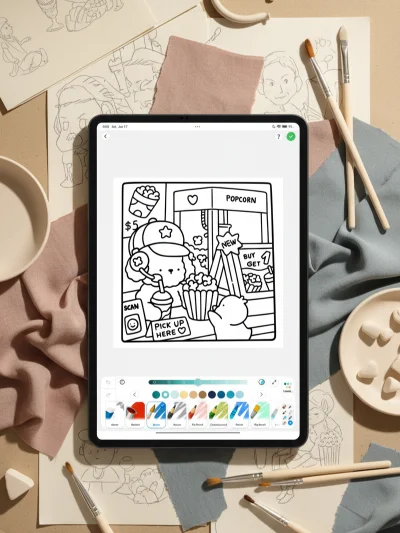
Color Pop takes a more artistic and creative approach than many typical coloring apps. Instead of relying on basic tap-to-fill coloring, it offers real painting-style mechanics with tools like watercolor, oil paint, and blending brushes. The experience feels much closer to digital art than casual coloring, especially for users who enjoy playing with textures, shading, and different techniques.
What Works Well
- Professional-style painting tools. Watercolor, oil, and blending brushes provide true artistic control.
- Extensive page library. A wide range of categories and designs to explore.
- AI-generated content. Create custom coloring pages whenever you want.
- Freehand drawing mode. Make original artwork instead of only coloring pre-made pages.
- Social community features. Share your work and find inspiration from other users.
- Line lock feature. Helpful for both precise detail work and more relaxed coloring styles.
- Smooth, modern interface. Clean layout that feels polished and easy to navigate.
Things to Keep in Mind
- Subscription required. There isn’t a fully usable free version, so payment is necessary for full access.
- Ads even during the trial. The free trial still includes frequent advertisements.
Bottom Line
Color Pop stands out for its painting-focused tools, AI page generation, and creative freedom beyond standard coloring apps. It’s a strong option for users who enjoy digital art and don’t mind paying for ongoing access.
Best for: Adults who want advanced painting-style coloring tools, users interested in AI-generated pages, and those comfortable with subscription-based apps.
Skip if: You want a free experience, dislike ads or subscriptions, or prefer simple tap-to-fill coloring.
7. Coloring Games: Color & Paint
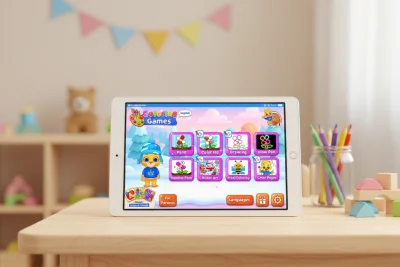
Coloring Games: Color & Paint is a coloring app made specifically for young children. The interface is colorful, playful, and very easy to navigate, with cheerful sound effects that help keep kids interested as they color. Everything about the design feels age-appropriate and carefully built with little users in mind.
The app offers several simple coloring modes. Children can tap to fill areas, drag their finger to paint, draw freely with basic tools, or follow paint-by-number prompts for more guided coloring. The illustrations focus on familiar, kid-friendly themes like animals, toys, and simple shapes, making them fun and manageable for small hands. Once the app is downloaded, it works fully offline, so kids can color anywhere without needing an internet connection.
What Works Well
- Fully ad-free. No interruptions and no exposure to advertisements.
- No in-app purchases. Everything is available immediately with no extra costs.
- Educational value. Supports color recognition and helps develop fine motor skills.
- Privacy-first design. Collects no user data and includes child-safe features throughout.
- Multiple coloring modes. Enough variety to stay engaging without overwhelming younger kids.
Things to Keep in Mind
- Designed only for children. The playful visuals and sound effects are meant for kids, not adult users.
- Intentionally simple artwork. Pages are basic and easy rather than detailed or intricate.
Bottom Line
Coloring Games: Color & Paint delivers a safe, ad-free, and completely unlocked coloring experience for children. It avoids the usual monetization pressures while still providing enough variety to keep kids entertained. Parents can feel comfortable handing over a device without worrying about ads, purchases, or privacy concerns.
Best for: Young children (preschool through early elementary), kids with special needs, and parents who value privacy and ad-free apps.
Skip if: You want adult-focused coloring, highly detailed artwork, or advanced creative tools.