
Pigment is a well-known digital coloring app that focuses heavily on realistic tools and a more “traditional art” feel. It’s built mainly for adults who want a more detailed, hands-on coloring experience.
| What Works Well | Things to Keep in Mind |
|---|---|
| Highly realistic pencil, marker, and paintbrush tools | Many of the best brushes are locked behind a subscription |
| Large library with 10,000+ pages and daily additions | Full color tools (like advanced palettes and color wheels) require premium |
| Hand-drawn artwork from independent artists | The free version can feel pretty limited |
| Multiple coloring modes for different levels of control | Only available on iOS (no Android option) |
| Smooth Apple Pencil support | Free trial auto-renews unless canceled |
Pigment is well-regarded for its realistic tools and polished design, making it a go-to for those who enjoy a more artistic approach to digital coloring. However, many of its key features are locked behind a subscription, and the free version offers only limited access to what makes the app appealing.
If you’d rather have something more flexible, cross-device, or easy to use without paying, it’s smart to consider a solid alternative.

Now, Why ColoringHub Really Stands Out?
If you love coloring but don’t want another app on your phone (or another subscription in your life), ColoringHub is kind of a breath of fresh air.
It’s one of those sites that just… works. You open it, pick a page, and start coloring. No account. No setup. No “start free trial” pop-up is trying to pressure you. And for a free site, it offers a lot more than you’d expect!
Here’s what makes ColoringHub stand out.
1. It’s 100% Free
A lot of “free” coloring apps are only free for about five minutes. Then suddenly everything good is locked. ColoringHub isn’t like that.
You get full access without paying, and you don’t need to sign up. You can browse, download, and color online immediately. That’s a big deal, especially if you just want something quick and relaxing.
And what I like most is that it doesn’t make you feel like you’re missing out the whole time. You’re not constantly being reminded that you need to upgrade just to enjoy the site. You can actually use it and enjoy it as-is.
2. You Can Color Online Or Print
This is such a nice bonus. Some platforms only work digitally, but here you get two options:
- Color directly in your browser
- Download and print PDFs for offline coloring
So if you switch between digital and paper coloring, this is a really convenient setup. And honestly, printable PDFs are still such a big deal for a lot of people. It’s great when you want to color with markers or colored pencils, or when you’re doing something screen-free.
3. The Content Library Is Massive
The amount of variety here is kind of wild! With hundreds of articles and tons of pages inside each one, you’re not stuck with the same small selection. It genuinely feels like there’s always something new to try—whether you want something cute, relaxing, or more detailed.
And since everything is free, you can explore different styles without feeling like you have to “commit” to one type of artwork. You can bounce between themes as often as you want.
What makes it even better is how organized everything is. Instead of digging through random pages, ColoringHub sorts content into clear sections like Kids, Kawaii, and Mandala & Patterns, so it’s easy to find what you’re actually in the mood for. And honestly, that matters more than people think—when you’re ready to color, you want the right page fast, not endless scrolling.
4. A Solid Coloring Tool
Some digital coloring tools feel cluttered or confusing, especially if you’re new. ColoringHub keeps things simple in a way that just makes sense. The layout is clean, with tools on the left, controls along the top, and color options on the right, so you don’t feel lost the second you open it.
And even though it’s easy to use, the tool selection is still surprisingly solid for a free platform. You get essentials like a fill bucket, multiple brush types, brush size and opacity controls, an eraser, undo/redo, plus pan and zoom. You can also download or print your finished page right from the tool, which is honestly super convenient.
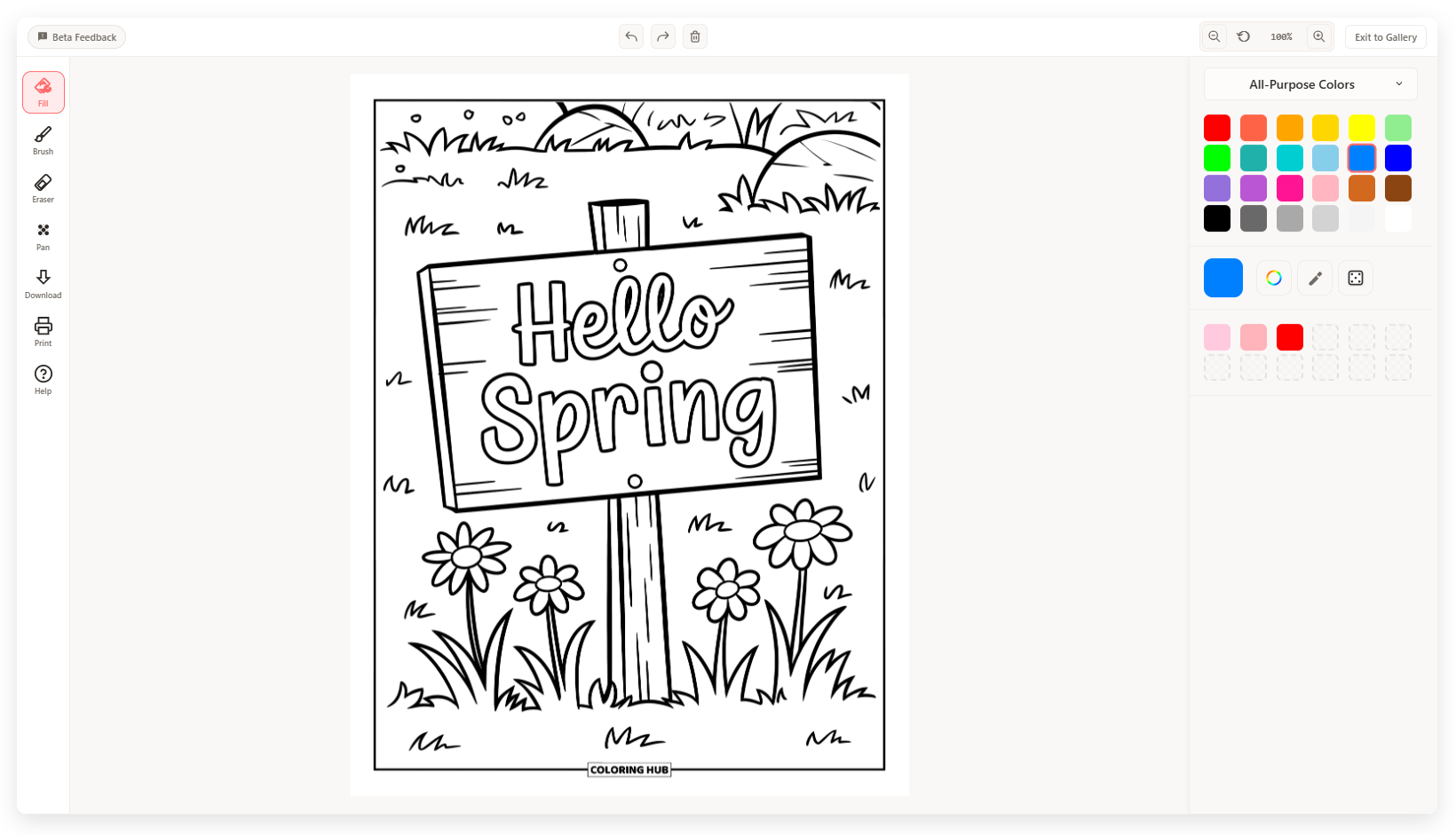
Overall, it gives you enough variety to keep coloring fun and customizable—without making the whole experience feel overwhelming. It’s the kind of setup that works well for both quick sessions and more detailed coloring.
5. The Color Options Are More Flexible than You’d Expect
This is another area where ColoringHub’s coloring tool surprises you. You can use preset palettes, create your own palettes, enter hex codes, use an eyedropper tool, and try a randomizer for quick inspiration.
It gives you a lot of freedom without making you pay for it. And if you’re someone who likes matching colors or creating a certain vibe, having options like hex codes and custom palettes is a really nice touch.
It’s also great for experimenting. You can test new combinations without feeling like you’re limited to a small set of colors.
6. It’s Great for Quick Sessions and Casual Coloring
Not everyone wants a “serious art app.” Sometimes you just want something relaxing for 10–20 minutes. ColoringHub is perfect for that because it’s fast, simple, and doesn’t ask for commitment. You don’t need to set anything up or remember logins.
It’s the kind of site you can open when you want a quick break, color a page, and move on. And that’s honestly a huge advantage for a lot of people.
7. Perfect for Families and Educators
Because the pages are printable and completely free, ColoringHub is honestly such a great option for families and teachers. It works well for everyone—not just adults who want super detailed designs.
For teachers, this is especially useful. You can download and print full sets of coloring pages in minutes, which makes it perfect for classrooms, after-school programs, and group activities. Parents benefit too, because they can hand kids real printable pages instead of adding more screen time.
It’s also great for things like:
- teachers
- parents
- homeschooling
- kids’ activities
- group events
And since there are so many themes, it’s easy to find something that fits. Whether you need cute designs for younger kids or more detailed pages for older students, you can usually find pages that work.
Summary Table
| Feature | Pigment | ColoringHub |
|---|---|---|
| Platform | iOS only (app) | Browser-based (any device) |
| Access | Requires app download and installation | No sign-up, no account, instant access |
| Cost | Free version with limited features; premium subscription required for most tools | Completely free, no subscriptions or paywalls |
| Creative Control | Advanced (tap-to-fill, freehand, automatic, advanced modes) | Simple and straightforward (designed for ease of use) |
| Coloring Options | Realistic pencil, marker, paintbrush simulation with pressure sensitivity | Print PDFs or color online; multiple brush styles (brush, marker, splatter, highlighter, glitter) |
| Audience | Adults seeking realistic traditional coloring experience, Apple Pencil users | Everyone (teachers, parents, kids, casual colorists, classroom use) |
| Tools | 10,000+ pages, Apple Pencil support, realistic brushes (most locked behind premium) | Tens of thousands of pages, fill bucket, adjustable brushes, eraser, undo/redo, printable PDFs |
| Ads | No ads | Yes, but unobtrusive |
| Artwork Style | Hand-drawn by independent artists | AI-generated illustrations |